v1 to v2 Migration
BDA v2 replaces the v1 report, segment, and data endpoints with one query endpoint. Instead of saving a custom report or segment first and pulling data from it afterwards, you describe the whole report — data set, date range, dimensions, metrics, filters, sorting — in a single POST /query request.
This page maps every v1 concept to its v2 equivalent. The complete v2 reference is the official API docs.
What Changed
| v1 | v2 | |
|---|---|---|
| Base URL | https://api-gateway.ezoic.com/bdaservices/ |
https://api-gateway.ezoic.com/gateway/bdaservices/v2/ |
| Authentication | ?developerKey= query parameter |
X-API-Key header |
| Report definitions | Saved server-side (predefined reports, custom reports, segments) | Sent inline with every query |
| Field naming | PascalCase (DomainId, StartDate) |
snake_case (domain_id, start_date) |
| Errors | Mixed formats | One JSON envelope with a machine-readable code and field-level details |
Your existing API key works on both versions — no key changes are needed. v2 accepts the key only in the X-API-Key header; the ?developerKey= query parameter is rejected.
Endpoint Mapping
| v1 endpoint | v2 equivalent |
|---|---|
GET getdomains/ |
GET /domains |
GET getcolumns/ |
GET /columns — now includes each column's type, unit, description, and which data sets it belongs to. |
POST getdata/ |
POST /query |
POST getCustomData/ |
POST /query |
GET getreports/, GET getreport/ |
None. Predefined reports are gone; send the equivalent query directly. |
GET getcustomreports/, POST createcustomreport/ |
None. There are no saved reports; store your query definitions in your own code or config. |
GET getsegments/, POST createsegment/ |
None. Segments are replaced by inline filters on POST /query. |
GET getfilters/, GET getmultifilters/, GET getmultifiltertypes/ |
GET /columns — filter on any column directly; there is no separate filter catalog. |
| — | GET /data-sets (new): lists the queryable data sets. |
| — | GET /date-range (new): the earliest and latest dates with data. |
Request Field Mapping
getdata and getCustomData requests translate to POST /query like this:
| v1 field | v2 field | Notes |
|---|---|---|
| — | data_set |
New, required. Most v1 reports correspond to the pageview data set. Use GET /data-sets for the options. |
StartDate / EndDate |
date_range.start_date / date_range.end_date |
Always required in v2 — there are no report-level default date ranges. |
DimensionColumns |
dimensions |
A plain list of column names; drop the { "Data": ..., "Type": ... } wrappers. |
MetricColumns |
metrics |
Same — a plain list of column names. |
DateGrouping (DAILY / WEEKLY / MONTHLY) |
— | Group by a time dimension instead: report_day, report_week, or report_month. |
SegmentIds |
filters |
Express the segment's conditions inline. See Segments Become Filters. |
Filters |
filters |
Operations are lowercase words: GREATER → greater_than, GREATER_OR_EQUAL → greater_than_or_equal, and so on. |
Order (ColumnNumber) |
sort |
Sort by column name, not index: { "column": "revenue", "direction": "desc" }. |
StartItem |
offset |
|
MaxItems |
limit |
Defaults to 100, max 100,000. |
DomainId |
domain_id |
Still optional; omit to query all your sites. |
Platform (EZOIC / ORIG / ALL) |
platform (ezoic / original / all) |
|
UrlParams / UrlFragments |
url_options.query_params / url_options.fragments |
Lowercase values include / exclude. v2 adds url_options.case_normalization. |
RevenueDecimalPlaces |
— | v2 returns full-precision numbers; round client-side. |
Before and After
A v1 getCustomData request:
POST /bdaservices/getCustomData/
{
  "StartItem": 0,
  "MaxItems": 10,
  "Platform": "ALL",
  "DomainId": 9999,
  "StartDate": "2026-07-24",
  "EndDate": "2026-07-30",
  "DimensionColumns": [{ "Data": "report_day", "Type": "string" }],
  "MetricColumns": [
    { "Data": "visits", "Type": "number" },
    { "Data": "revenue", "Type": "number" },
    { "Data": "epmv", "Type": "number" }
  ],
  "Order": { "ColumnNumber": 0, "Direction": "DESC" },
  "Filters": [
    { "Type": "INCLUDE", "FilterKey": "epmv", "OperationId": "GREATER", "FilterValue": "3" }
  ]
}
The same report in v2:
curl -X POST "https://api-gateway.ezoic.com/gateway/bdaservices/v2/query" \
  -H "X-API-Key: YOUR_API_KEY" \
  -H "Content-Type: application/json" \
  --data '{
  "data_set": "pageview",
  "date_range": { "start_date": "2026-07-24", "end_date": "2026-07-30" },
  "dimensions": ["report_day"],
  "metrics": ["visits", "revenue", "epmv"],
  "filters": [
    { "column": "epmv", "operator": "greater_than", "value": 3 }
  ],
  "sort": [{ "column": "report_day", "direction": "desc" }],
  "limit": 10,
  "offset": 0,
  "domain_id": 9999,
  "platform": "all"
}'
import requests
url = "https://api-gateway.ezoic.com/gateway/bdaservices/v2/query"
headers = {"X-API-Key": "YOUR_API_KEY", "Content-Type": "application/json"}
payload = """{
"data_set": "pageview",
"date_range": { "start_date": "2026-07-24", "end_date": "2026-07-30" },
"dimensions": ["report_day"],
"metrics": ["visits", "revenue", "epmv"],
"filters": [
{ "column": "epmv", "operator": "greater_than", "value": 3 }
],
"sort": [{ "column": "report_day", "direction": "desc" }],
"limit": 10,
"offset": 0,
"domain_id": 9999,
"platform": "all"
}"""
response = requests.post(url, headers=headers, data=payload)
print(response.json())<?php
$ch = curl_init("https://api-gateway.ezoic.com/gateway/bdaservices/v2/query");
curl_setopt($ch, CURLOPT_RETURNTRANSFER, true);
curl_setopt($ch, CURLOPT_CUSTOMREQUEST, "POST");
curl_setopt($ch, CURLOPT_HTTPHEADER, ["X-API-Key: YOUR_API_KEY", "Content-Type: application/json"]);
curl_setopt($ch, CURLOPT_POSTFIELDS, '{
"data_set": "pageview",
"date_range": { "start_date": "2026-07-24", "end_date": "2026-07-30" },
"dimensions": ["report_day"],
"metrics": ["visits", "revenue", "epmv"],
"filters": [
{ "column": "epmv", "operator": "greater_than", "value": 3 }
],
"sort": [{ "column": "report_day", "direction": "desc" }],
"limit": 10,
"offset": 0,
"domain_id": 9999,
"platform": "all"
}');
$response = curl_exec($ch);
curl_close($ch);
echo $response;The response is rows keyed by your requested columns, plus the total match count for pagination:
{
  "rows": [
    { "report_day": "2026-07-30", "visits": 1200, "revenue": 15.4321, "epmv": 12.8618 }
  ],
  "total_rows": 7
}
Segments Become Filters
In v1 you created a segment once with createsegment, then referenced its id in SegmentIds. In v2 the segment's conditions go straight into the query's filters. Every filter in the list must match; use an any_of group where matching any one condition is enough.
The v1 segment "epmv of 100 or more, from the US or Canada":
POST /bdaservices/createsegment/
{
  "SegmentName": "High EPMV US and Canada",
  "SegmentFilters": {
    "21": { "FilterIntOperationId": "GREATER_OR_EQUAL", "FilterValue": "100" }
  },
  "SegmentMultiFilters": {
    "1": { "FilterValues": ["US", "CA"] }
  }
}
becomes two inline filters in v2 — no ids, no separate create step:
"filters": [
  { "column": "epmv", "operator": "greater_than_or_equal", "value": 100 },
  { "column": "country", "operator": "in", "values": ["US", "CA"] }
]
You don't have to translate your existing segments by hand. In the BDA web UI, open the segment picker, click the three-dot menu next to a segment, and choose Copy for API — it copies the segment's conditions as a ready-to-paste v2 filters array:
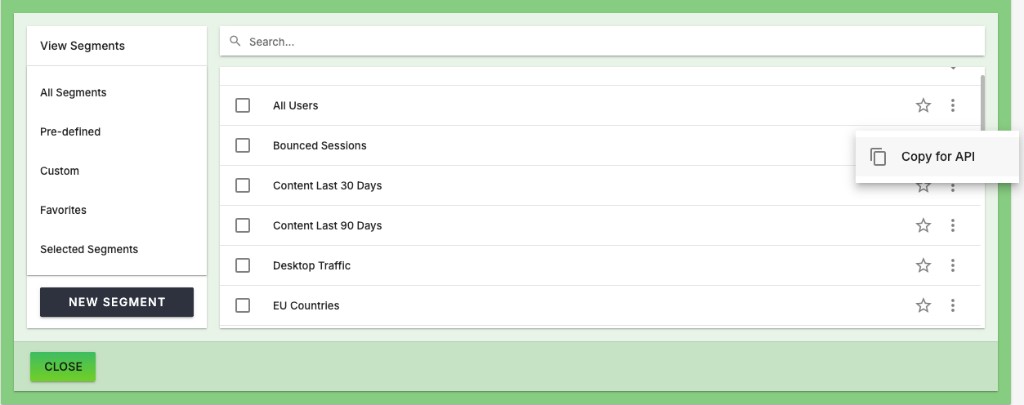
Any column from GET /columns is filterable, so v1's filter, multifilter, and multifilter-type catalogs have no v2 counterpart.
Saved Custom Reports
v2 has no server-side saved reports. If your integration created reports with createcustomreport and pulled them by id, keep the query JSON wherever you keep configuration and send it with each request. Report-level default date ranges (like BASE_LAST_7) are gone too — compute the dates when you build the query.
Errors
Every v2 error uses the same envelope, with a machine-readable code (unauthorized, forbidden, not_found, validation_error, concurrent_request_limit, rate_limit_exceeded, upstream_error, internal_error) and, on validation errors, field-level details:
{
  "error": {
    "code": "validation_error",
    "message": "the query has 1 problem(s)",
    "details": [
      { "field": "metrics[0]", "message": "unknown column 'revanue'; did you mean 'revenue'?" }
    ]
  }
}